Getting Started
System Prerequisites
Surfactant requires Python 3.10 or newer. Tests are regularly run on Linux, macOS, and Windows, though it should also work on other operating systems such as FreeBSD.
Installation
For Users:
For ease of use, we recommend using pipx since it transparently handles creating and using Python virtual environments, which helps avoid dependency conflicts with other installed Python apps. Install pipx by following their installation instructions.
Install Surfactant using
pipx install(with python >= 3.10)
pipx install surfactant
Note: Mach-O file support requires installing Surfactant with the
machooptional dependencies, and Java file support requires installing with thejavaoptional dependencies (e.g.pipx install surfactant[macho,java]).
Install plugins using
pipx inject surfactant. As an example, this is how the fuzzy hashing plugin could be installed from a git repository (PyPI package names, local source directories, or wheel files can also be used).
pipx inject surfactant git+https://github.com/LLNL/Surfactant#subdirectory=plugins/fuzzyhashes
If for some reason manually managing virtual environments is desired, the following steps can be used instead:
Create a virtual environment with python >= 3.9 and activate it [Optional, but highly recommended over a global install]
python -m venv venv
source venv/bin/activate
Install Surfactant with
pip install
pip install surfactant
Install plugins using
pip install. As an example, this is how the fuzzy hashing plugin could be installed from a git repository (PyPI package names, local source directories, or wheel files can also be used).
pip install git+https://github.com/LLNL/Surfactant#subdirectory=plugins/fuzzyhashes
For Developers:
Create a virtual environment with python >= 3.10 [Optional, but recommended]
python -m venv venv
source venv/bin/activate
Clone sbom-surfactant
git clone git@github.com:LLNL/Surfactant.git
Create an editable surfactant install (changes to code will take effect immediately):
pip install -e .
To install optional dependencies required for running pytest and pre-commit:
pip install -e ".[test,dev]"
pip install with the -e or --editable option can also be used to install Surfactant plugins for development.
Generating an SBOM
The most straightforward method to start is using the surfactant tui subcommand to start the TUI, then use the Generate tab to generate an SBOM, and the Context tab to create and modify specimen context files. The rest of this section will assume that the command line surfactant generate subcommand is being used, however the same general concepts such as the specimen context can still apply when using the TUI.
To generate an SBOM without the TUI, run the surfactant generate subcommand. For more details on the options it takes, please refer to this page on basic usage. For more information on writing Surfactant context files for software specimens, see the documentation on how to build a specimen context file.
The following diagram gives a high-level overview of what Surfactant does. The internal implementation overview page gives more detail about how Surfactant works internally.
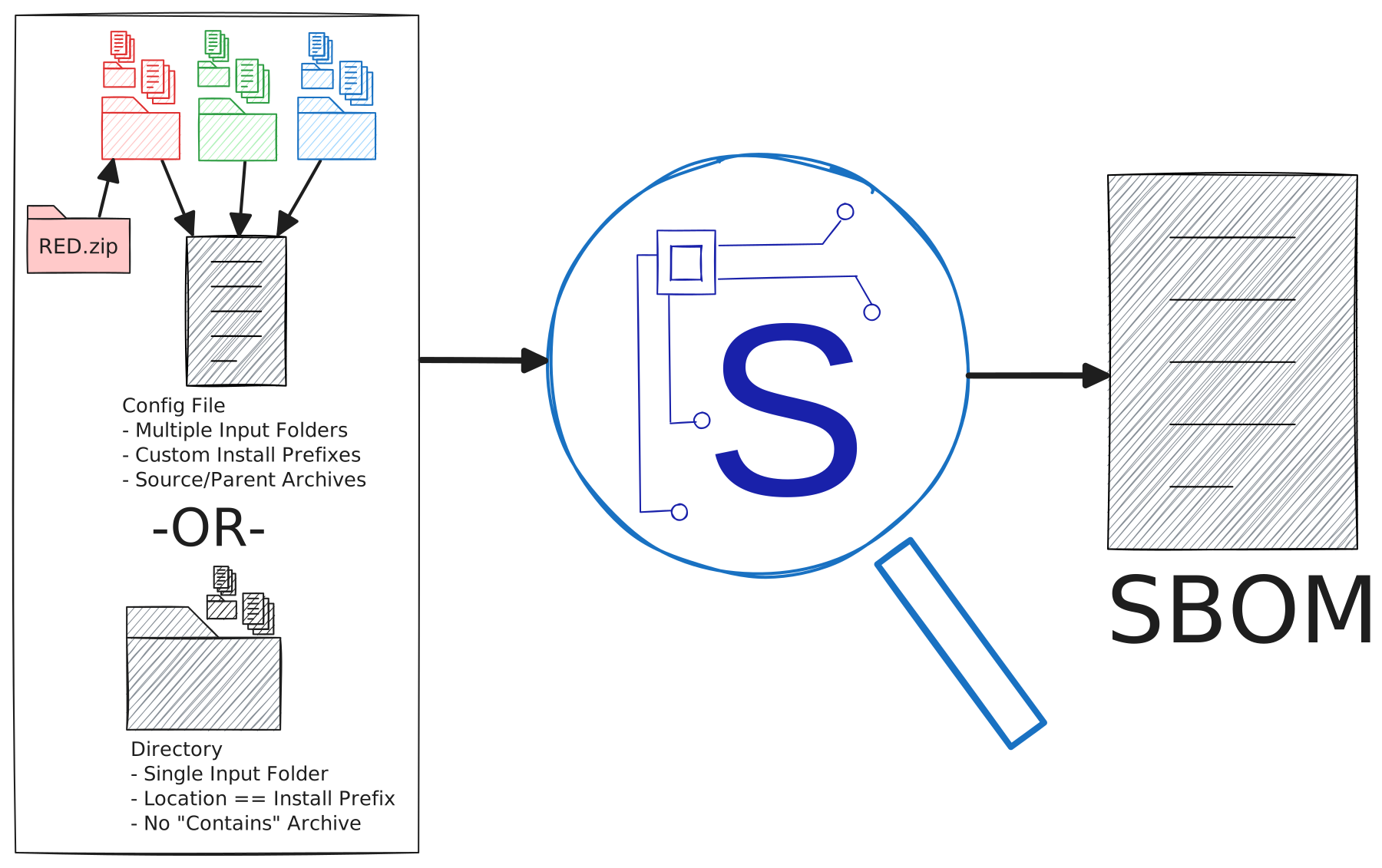
In simpler cases such as generating an SBOM for a single file or directory that lives on the same system as Surfactant is being run on, Surfactant can just be given the path to generate the SBOM for:
surfactant generate "C:/Program Files/Adobe/Acrobat Reader" acrobat_reader_sbom.json
This command will generate an output SBOM file named acrobat_reader_sbom.json for all files in C:/Program Files/Adobe/Acrobat Reader, with install paths for files in the SBOM that show them as being under C:/Program Files/Adobe/Acrobat Reader. Alternatively, running Surfactant from the C:/Program Files/Adobe folder with the command surfactant generate "Acrobat Reader" acrobat_reader_sbom.json would result in the install paths in the SBOM showing the files as being under the relative path Acrobat Reader/.
If the path is to a single file an SBOM will be generated for that single file, unless its name ends in a .json extension (or the very rare case of the path being given to Surfactant beginning with one of 3 special prefixes: context:, file:, and dir:).
If an SBOM is being generated that requires more fine-grained control over various options such as the install prefix, or for capturing information on multiple locations, then Surfactant should be given a path to a specimen context file. It is strongly recommended to always include a .json file extension as part of the file name.
Special Specimen Context Argument Prefixes
For the specimen context command line argument, the path to a file with a .json extension is always treated as a specimen context file, and a path to a file without a .json file extension is treated as being for generating an SBOM with just that single file. To override this behavior, the specimen context argument to surfactant generate recognizes the special prefixes context:, file:, and dir:. For example, surfactant generate file:home/abc.json would tell Surfactant to generate an SBOM with a single entry in it, for the file called abc.json in the home directory (without the file: prefix, home/abc.json would be interpreted as a specimen context file).
Similarly, a context: prefix forces Surfactant to interpret the given file path as a specimen context file regardless of if the file name is missing a .json extension.
A file or directory name that starts with one of these special prefixes could cause problems, however these cases should be extremely rare and can always be solved by creating a specimen context file (which since it is user created, can be given a file name that avoids issues). However, a special prefix could also be used to solve the issue. For example with a directory named context:myapp, running surfactant generate context:myapp will look for a specimen context file called myapp. To resolve this, the dir: prefix could be added to essentially tell Surfactant “this directory is actually named context:myapp”. Running surfactant generate dir:context:myapp would then generate an SBOM for everyting in a directory called context:myapp.
NOTE: As long as the directory or file name that starts with the special prefix isn’t the first thing in the argument, adding a special prefix shouldn’t be necessary. For example, running surfactant generate abc/context:myapp or surfactant generate /etc/context:myapp to create an SBOM from a directory or file called context:myapp should work without issues since the specimen context argument doesn’t start with one of the special prefixes.
Surfactant specimen context files should never be given a name that starts with one of these special prefixes, and should always end in a .json file extension.
Understanding the SBOM Output
The following is a brief overview of the default SBOM file output format (which follows the CyTRICS schema). It is not an exhaustive guide to the SBOM format. When the schema is made publicly available a link will be included here.
Software
This section contains a list of entries relating to each piece of software found in the sample. Metadata including file size, vendor, version, etc are included in this section along with a uuid to uniquely identify the software entry.
Relationships
This section contains information on how each of the software entries in the previous section are linked.
Uses: this relationship type means that x software uses y software i.e. y is a helper module to x
Contains: this relationship type means that x software contains y software (often x software is an installer or archive such as a zip file)
Star Relationships
This section contains information on how analysis data or observation entries are related/linked to software (or hardware) entries.
Observations
This section contains observations, typically related to CVEs that impact a piece of software.
Analysis Data
This section is for listing files that are output by plugins/analysis tools.
Hardware
This section contains information on hardware, ranging from a fairly high-level down to individual components on a PCB. Surfactant does not currently populate this section, it is either filled in manually or using other tools that are aimed at analyzing based on pictures of circuit boards.
System
This section contains information on the overall system that software and hardware entries are a part of. Typically it will be manually added to an SBOM that has been generated by Surfactant, though the merge command can also be given an option to generate a system entry.